
How to unlock an iPhone, You could have abandoned the password to, besides the fact that it’s disabled :
The decent news about iPhone protection is that a thief or over-peculiar stranger has virtually no chance of attending to the information in your cellphone unless you have put the passcode on a yellow adhesive word and affixed it to the back of the case. even the FBI has been unable to able suspects’ iPhone’s after predominant crimes.
afterwards coming into the passcode afield just just a few times, your iPhone will lock you out from making an attempt more codes for a short while. continue to enter the unsuitable passcode, and you might find yourself bound out permanently.
here’s what you could do if that condition arises.
a way to liberate a disabled iPhone the usage of a computer
if your iPhone is disabled, the horrible information is that there’s no way to bypass the passcode and easily restart the iPhone; if that have been viable, any person could be able to try this, and it would defeat the aspect of the pass-code’s safety.
A disabled iPhone will acquaint you that you just can not log in for some length of time, which might be anyplace from a minute to always.
Prerequisite For Flashing :
If you have screen with iPhone Disabled don’t worry will help you with the technical guidance.
First of all you have to put your phone in to Recovery Mode or DFU ( Device Firmware Update )Mode. How to do it.
Steps :
Connect your phone with iTunes.
If you have lower model from the 8+ Here is the technique for DFU mode
Press both together Power Key + Back Button (Home Button).
When the phone has blank screen then release the Power key but hold Back button (Home Key) for 10 seconds and now you are successfully entered in recovery mode.
Now iTunes Have Following Screen :
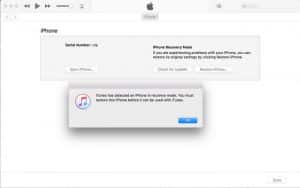
Now iTunes Give you the instruction that your phone has in Recovery Mode click on Ok button and move forward to the next Step.
Step 2
Now we have to select the recovery file or Flash file to Format the iPhone. How to do it -> follow the below steps.
Now you have 2 Buttons on the screen
1 ) Check for Update : This is not for us.
2) Restore iPhone : Here we have to click
Before click on this button i have clear something
If you have the firmware file in your PC so Click on restore button with ” SHIFT” key from the keyboard, Or else do you want to restore online then just click restore button.
Download Firmware : Here
If you have file already then it will take less time.
Now we have following screens while these Process : See in Slide Show.
Now just seat back and wait for to end the task.
Once flashing is completed you phone starts with the short horizontal line and with apple logo. Wait until the progress bar finished.
Now phone has successfully Unlocked.
If this is helpful to you just share it with your friends.
Thank You
RAJA GSM
Wholesale supplier of original GSM tools, server credits & activation licenses, and genuine iPhone spare parts. Hardware delivered across India — unlocking & digital services worldwide.
10, Arnath Apartment, Manav Mandir Rd,
Memnagar, Ahmedabad, Gujarat 380052, India
Phone / WhatsApp: +91 90901 41476
Quick Links
© 2026 Raja GSM — All rights reserved. | Global GSM wholesale: tools, credits & unlocking | Hardware delivery within India · digital services worldwide
// Raja GSM
How can we help you today?
Genuine iPhone parts, worldwide unlocking and in-house repairs — pick what you need or chat with us.
